At a glance
- Choose the muscle group and follow its positioning demonstration.
- Review the original slow- and fast-movement recording instructions.
- Use the stated measurement limitations: the original app does not replace start- or end-angle measurements.
QUICK LINKS TO THE TESTS
Gastrocnemius
Soleus
Hamstrings at 40° hip
Hamstrings at 90° hip
Quadriceps
INTRODUCTION
This write up is for the App "Spasticity Assessor" available on Google Play for Android phones.
This app has been designed to provide allied health clinicians and medical practitioners with an accurate, user-friendly method of assessing lower limb spasticity in a clinical setting.
The app which is based on the principles of the Modified Tardieu scale enables you to assess spasticity of the gastrocnemius, soleus, hamstrings (at both 40° and 90° hip flexion) and quadriceps muscles. It is able to provide you with accurate values of joint range of motion (ROM) and speed of movement which are unable to be obtained using a traditional goniometer. It can also be used to provide real-time feedback ensuring consistency between clinicians and it can be used as a valuable teaching resource for students and inexperienced clinicians.
The use of this system to measure speed of movement and joint ROM has been validated in a group of 35 healthy controls and 35 individuals with a neurological condition. These studies involved comparing the concurrent validity of the Smartphone system to a criterion reference three-dimensional motion analysis (3DMA) system with excellent results. These studies included the completion of over 4,000 trials in total. Without further instrumentation, the app is not able to measure accurate start or end angles so if you usually measure either of these values with a goniometer as a part of your routine clinical practice then please continue to do so in conjunction with this system.
EQUIPMENT
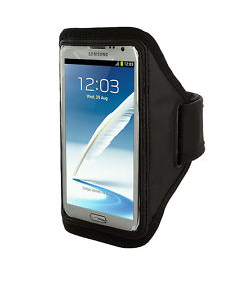
The only equipment required to use this app is a compatible phone and a phone strap to fit the phone being used (similar to below).
INSTRUCTIONS AND VIDEO DEMONSTRATIONS
GASTROCNEMIUS
Step 1: Ensure correct phone placement
Patient lying in supine with hip in a neutral position and knee extended.
Phone is placed on the dorsum of the foot with the earpiece resting proximally (near the ankle joint) and the controls distally (near the toes).
Step 2: Select muscle group to be assessed by clicking the relevant button
Step 3: complete V1 movement
Press “START”.
Complete the slow passive ROM over a 1-2 second duration.
Move the ankle from plantarflexion to dorsiflexion and stabilise the lower leg to prevent knee movement.
Press “STOP”.
If you would like an exact end angle, this needs to be measured with a goniometer.
Step 4: complete V3 movement
Press “START”.
Repeat the above movement as fast as possible.
Stop at the point of muscle reaction.
Press “STOP”.
Results
Once you press “STOP” the peak testing velocity and full ROM will be displayed on the screen.
SOLEUS
Step 1: Ensure correct phone placement
Patient lying in supine with the hip and knee flexed to as close to 90° as possible. The lower leg can be placed on an appropriate sized box or wedge to facilitate correct positioning.
Phone is placed on the dorsum of the foot with the earpiece resting proximally (near the ankle joint) and the controls distally (near the toes).
Step 2: Select muscle group to be assessed by clicking the relevant button
Step 3: complete V1 movement
Press “START”.
Complete the slow passive ROM over a 1-2 second duration.
Move the ankle from plantarflexion to dorsiflexion and stabilise the lower leg to prevent knee movement.
Press “STOP”.
If you would like an exact end angle, this needs to be measured with a goniometer.
Step 4: complete V3 movement
Press “START”.
Repeat the above movement as fast as possible.
Stop at the point of muscle reaction.
Press “STOP”.
Results
Once you press “STOP” the peak testing velocity and full ROM will be displayed on the screen.
HAMSTRINGS AT 40° HIP FLEXION
Step 1: Ensure correct phone placement
Patient lying in supine with hip as close to 40° flexion as possible.
The patient’s thigh can rest on the therapist’s leg or a wedge to facilitate correct positioning.
Phone is placed on the anterior lower leg approximately halfway between the knee and the ankle joint with the earpiece resting proximally and the controls distally.
Step 2: Select muscle group to be assessed by clicking the relevant button
Step 3: complete V1 movement
Press “START”.
Complete the slow passive ROM over a 1-2 second duration.
Move the knee from flexion to extension and stabilise the thigh to prevent hip movement.
Press “STOP”.
If you would like an exact end angle, this needs to be measured with a goniometer
Step 4: complete V3 movement
Press “START”.
Repeat the above movement as fast as possible.
Stop at the point of muscle reaction. Press "STOP".
Results
Once you press “STOP” the peak testing velocity and full ROM will be displayed on the screen
HAMSTRINGS AT 90° HIP FLEXION
Step 1: Ensure correct phone placement
Patient lying in supine with hip as close to 90° flexion as possible.
The patient’s thigh can rest on the therapist’s leg or a wedge to facilitate correct positioning.
Phone is placed on the anterior lower leg approximately halfway between the knee and the ankle joint with the earpiece resting proximally and the controls distally.
Step 2: Select muscle group to be assessed by clicking the relevant button
Step 3: complete V1 movement
Press “START”.
Complete the slow passive ROM over a 1-2 second duration.
Move the knee from flexion to extension and stabilise the thigh to prevent hip movement.
Press “STOP”.
If you would like an exact end angle, this needs to be measured with a goniometer
Step 4: complete V3 movement
Press “START”.
Repeat the above movement as fast as possible.
Stop at the point of muscle reaction. Press "STOP".
Results
Once you press “STOP” the peak testing velocity and full ROM will be displayed on the screen
QUADRICEPS
Step 1: Ensure correct phone placement
Patient lying in prone with hip in a neutral position and the knee extended.
Phone is placed on the lateral surface of the lower leg approximately halfway between the knee and the ankle joint with the earpiece resting proximally and the controls distally.
Step 2: Select muscle group to be assessed by clicking the relevant button
Step 3: complete V1 movement
Press “START”.
Complete the slow passive ROM over a 1-2 second duration.
Move the knee from flexion to extension and stabilise the thigh/buttock to prevent hip movement.
Press “STOP”.
Step 4: complete V3 movement
Press “START”.
Repeat the above movement as fast as possible.
Stop at the point of muscle reaction.
Press “STOP”.
Results
Once you press “STOP” the peak testing velocity and full ROM will be displayed on the screen.
CONTRIBUTORS

Megan Banky

Ross Clark

Gavin Williams
Megan Banky is a physiotherapist specialising in neurological rehabilitation at the Epworth Hospital in Melbourne, Australia. She is currently doing a part-time PhD at the University of the Sunshine Coast.
Ross Clark is a National Health and Medical Research Council RD Wright Biomedical Fellow at the University of the Sunshine Coast. He created this site and is the principal developer of the software, hardware and visualisation systems used.
Gavin Williams is the Foundation Chair of Physiotherapy at the Epworth Hospital in Melbourne, and an Associate Professor at the University of Melbourne. He is a world leader in gait rehabilitation after brain injury.
FUNDING RECEIVED FROM