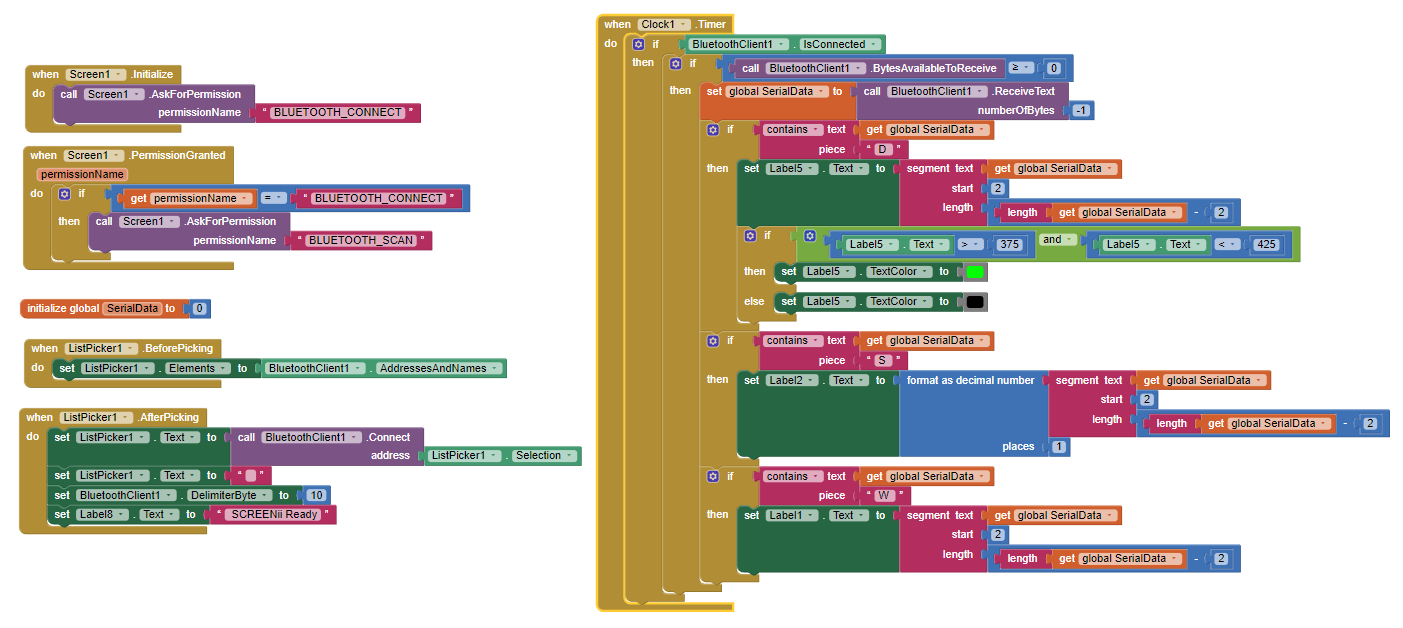
I output the serial data over bluetooth with a simple header in the same line. For example it would look like:
A 651
A 652
A 650
B 12654
A 651
If I was sending data from 2 sensors that have different sample rates. Then to convert the serial data into something useable you can use contains text and the text segment method to categorise the individual sensor data. Works great! Also in AI any numbers in the serial string are treated as numbers so it is very easy to work with.
The right side of this image is great to use as a template for serial data over bluetooth: https://community.appinventor.mit.edu/uploads/default/original/2X/3/3183d1a513784e75c4188f76ab484510f6c65dd6.png
But you also need to allow permissions on Android 12. See the image below on how to do it.